[ Quoting software for the trades ]
Send better quotes in four minutes.
Pick your trade, enter your real numbers once, and PriceWrench turns every job into a priced, branded quote with Good / Better / Best options, straight from your phone.
14-day free trial · No card to start · Works on your phone
12 trade packs
Plumbing / HVAC / Electrical / Handyman / Garage Door / Appliance Repair / Painting / Flooring / Pressure Washing / Cleaning / Lawn Care / Custom
[01] How it works
Set it up once.
Quote forever.
Most quotes are slow because the math lives in your head. PriceWrench writes your rates, markups and job times down once, then does the arithmetic every time.
-
01
Pick your trade
Each trade pack loads a starter price book: tasks, units, pricing method, modifiers and wording. Run more than one trade? Pick them all.
- Plumbing
- HVAC
- Electrical
- Handyman
- Painting
- + 7 more
-
02
Enter your real numbers
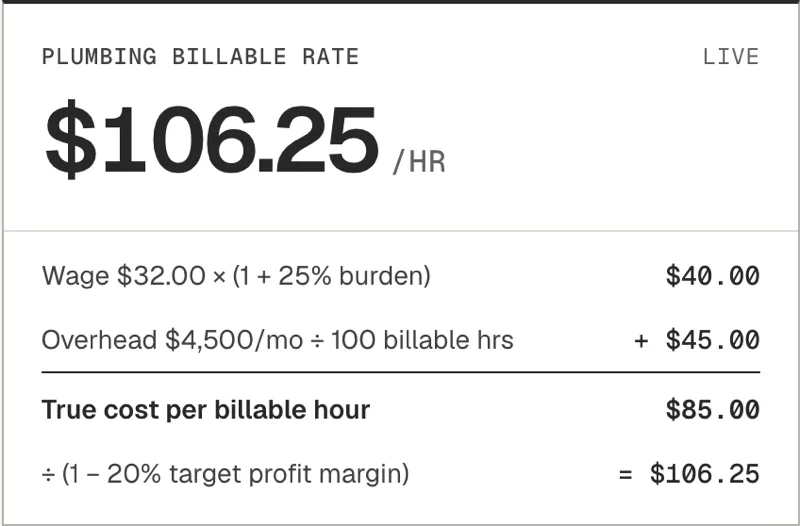
Wage, burden, overhead, billable hours, margin. The calculator gives you the hourly rate you actually need to charge.
-
03
Send three options, not one
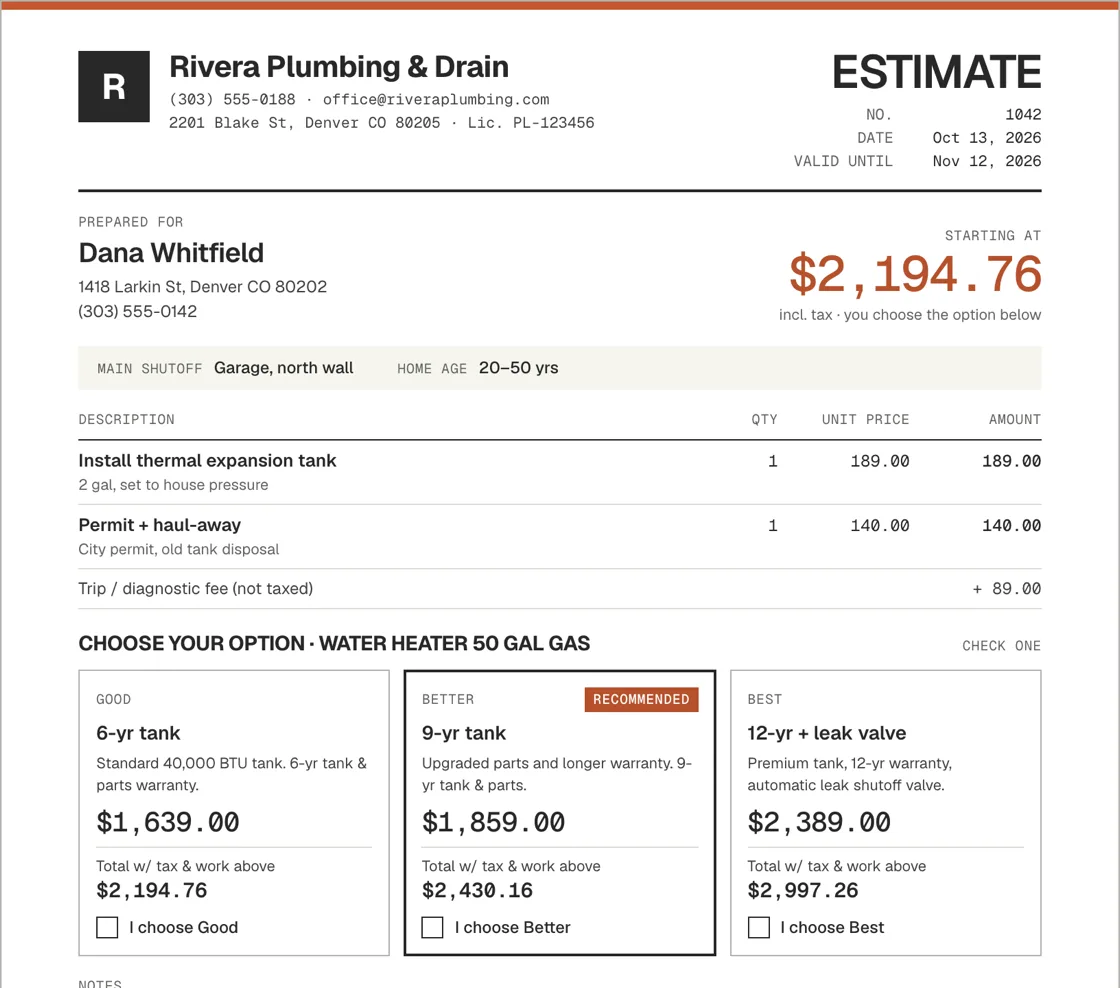
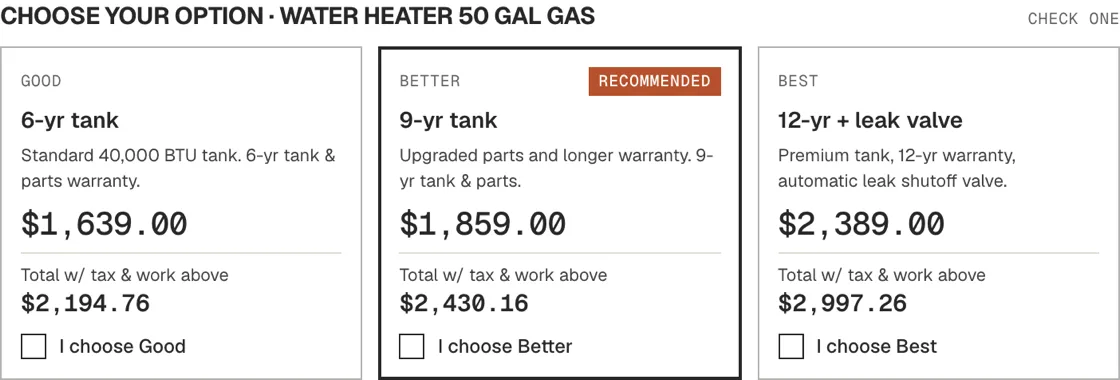
Every quote can offer Good, Better and Best. Customers pick, instead of haggling. Print it, or save it as a branded PDF from the print dialog.
[02] What's inside
Built like a spec sheet.
Everything a one-truck or five-truck shop needs to price a job properly, and nothing it doesn't.
- Trade packs
- 12
- Pricing modes
- 4
- Tiers per quote
- 3
- A.01
Four ways to price
Flat (hours × rate + materials), measured (per sq ft, per linear ft, with waste %), fixed, and recurring visits with frequency discounts.
- A.02
Modifiers that show their work
Difficulty, access, after-hours, trip fees, minimum charges, member discounts. Each one is itemized on the quote.
- A.03
A quote that looks like you
Your logo, your terms, your acceptance line. Called an Estimate, Proposal or Quote, whatever your trade expects.
- A.04
Customer service menu
Print a clean menu of your services and prices to leave on the counter or hand over at the door.
- A.05
Exports for Jobber + Housecall Pro
Export your price book as CSV laid out for each one's import, or a full spreadsheet for everything else.
- A.06
A clock on every quote
A quote timer and a weekly streak show how fast you're getting. Beat your best time.
[03] The four-minute quote
Quote timerQuote before you leave the driveway.
The first quote in the door often wins the job. PriceWrench times every quote you build, so you can watch yourself get faster.
- 00:00New jobCustomer + address
- 00:40Tap in the tasksFrom your price book, already priced
- 01:55ModifiersTrip fee, access
- 02:30Three tiersGood / Better / Best
- 03:42DoneBranded PDF, ready to send
[04] Your numbers
Your prices are nobody else's business.
Your margins stay private
Customers see the prices on the quote, never your hours, rates or markup. Your price book is yours: no ads, no analytics, never sold.
One-file backup
Export everything to a single backup file. Restore it on a new phone in seconds.
Everything editable
Starter prices are placeholders, not market rates. Change any task, rate or wording to match how you work.
[05] Pricing
$19 a month
- Every trade pack, plus custom packs
- Quotes and customers with no limit
- Send quotes as a link customers can accept
- Synced across your phone and computer
- Jobber + Housecall Pro CSV export
Field-service apps like Jobber and Housecall Pro start at $29–$79 a month and run your whole business. PriceWrench does one job, quoting, for less.
[06] Straight answers
Frequently asked questions
Are the starter prices real market prices?
No. Seeded hours and costs are placeholders to get you started. Swap in your own numbers during setup and every quote after that uses them.
Can I send quotes from the app?
Yes, as a link. Tap Send link and share it by text or email from your phone. Your customer opens it, picks an option and accepts, and you get an email. You can still print a quote or save it as a PDF.
Does it work with Jobber or Housecall Pro?
It exports your price book as CSV using the columns each one's import help article lists, plus a full spreadsheet. The exports haven't been tested against a live account, so compare them with the sample file in your own account before importing.
Can I use it on more than one device?
Yes. Sign in on your phone and your computer and your price book and quotes stay in sync. If both change while offline, you choose which version to keep, and the other downloads as a backup file.
My trade isn't on the list.
Start with the Custom pack and build your own tasks, or import a trade pack file (.json). Every task, rate and word is editable.
[07] Next job
Your next quote
is four minutes away.
Set up your trade tonight. Quote tomorrow's first call from the driveway.